
Enhance Your Chat GPT Experience with Custom Styles
Overview
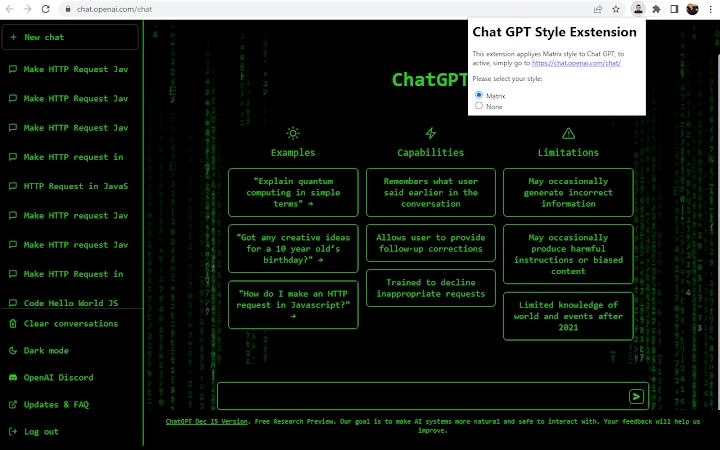
The Chat GPT Style Overlay extension is designed to elevate the visual experience of using Chat GPT within web browsers. It allows users to apply custom style overlays to the interface, offering a more personalized and immersive interaction. The primary purpose is to enhance aesthetics and user engagement by enabling dynamic visual changes without altering core functionality. This tool is ideal for users who value both productivity and visual appeal in their daily digital workflows.
Target users include professionals, students, and tech-savvy individuals who frequently interact with AI-driven chat interfaces. The extension is particularly useful for those who want to personalize their environment, whether for focus, creativity, or simply aesthetic satisfaction. Real-world usage scenarios include using the tool during brainstorming sessions, coding assistance, or content creation, where a unique interface can improve concentration or mood.
Developed by Yevgeni Kabisher, the extension emphasizes user privacy and data security. No information is collected or transmitted during use, ensuring that all interactions remain private. The developer did not provide additional details about their background or prior projects. Version 0.2 introduces the ability to enable or disable the matrix-style overlay, expanding user control over visual presentation.
Key Features & Capabilities
- Custom Style Overlay – Apply unique visual themes to the Chat GPT interface, transforming its appearance without affecting functionality.
- Matrix Style Toggle – Version 0.2 adds the option to enable or disable a dynamic matrix-style visual effect, enhancing the futuristic aesthetic.
- One-Click Switching – Easily toggle between different visual styles, including the original interface, for seamless transitions.
- Privacy-First Design – No data is collected or sent to external servers; all styling is applied locally within the browser.
- Non-Invasive Integration – Works directly in the browser without requiring changes to the base Chat GPT application.
These features allow users to tailor their experience to match their mood, task, or environment. For example, a user might switch to the matrix style during a late-night coding session to improve focus, or revert to the original layout when collaborating with a team. The ability to switch styles quickly supports flexible workflows and enhances user satisfaction.
User Interface, Workflow & Performance
The extension features a minimal and intuitive interface, designed to integrate seamlessly with existing browser workflows. Users can access style settings through a simple icon in the browser toolbar, allowing quick access to visual preferences. Navigation is straightforward, with clear options to enable or disable the matrix effect and switch back to the default appearance.
Workflow efficiency is maintained through instant application of style changes, with no noticeable delay or reload required. The developer did not specify resource usage details, but based on general software behavior, the extension is expected to have a low impact on system performance. Stability appears to be consistent, as the tool operates as a frontend overlay without modifying core application logic.
Performance observations are based on general software behavior patterns. The extension does not appear to consume significant CPU or RAM resources, which is typical for lightweight browser tools. Users can expect smooth operation across multiple sessions, with no reported issues related to crashes or freezing.
Compatibility & System Requirements
The extension is compatible with Windows and Mac operating systems, supporting modern web browsers used for accessing Chat GPT. Version 0.2 is designed to function across platforms with consistent behavior. The installation size is 2.3 MB, indicating a lightweight footprint suitable for most devices.
Exact system requirements were not listed. Compatibility information was partially provided, focusing on OS support rather than hardware specifications. The developer did not detail minimum processor, RAM, or browser versions needed for optimal performance. Users are advised to ensure their browser is up to date for best results.
Pros and Cons
Pros
- Enhances visual appeal of Chat GPT interface with customizable styles
- Privacy-focused – no data is collected or transmitted
- Simple one-click toggling between styles and original layout
- Lightweight at just 2.3 MB
- Free to download and use
Cons
- Limited to visual customization; no functional enhancements
- No detailed system requirements provided
- Only one style (matrix) available in version 0.2
- Dependent on browser compatibility and updates
- Developer background not publicly documented
FAQ Section
Is the extension compatible with all browsers?
The extension is designed for use with modern browsers that support Chrome and Firefox extensions. Compatibility may vary depending on the browser's update status and extension policies.
Does the extension collect or share my data?
No, the developer explicitly states that no information is used or sent to any external party. All styling is applied locally within the browser.
Can I use the extension offline?
Yes, the extension functions without an internet connection once installed, as it only modifies the visual layer of the Chat GPT interface.
How often are updates released?
Updates are released as needed. Version 0.2 introduced the matrix style toggle, and future versions may include additional visual themes.
What is the license type for this extension?
The extension is free to use and distribute. No commercial licensing is required for personal or professional use.
Final Thoughts + CTA
The Chat GPT Style Overlay extension offers a simple yet effective way to personalize your AI chat experience. While it does not add new functionality, its focus on aesthetics and user privacy makes it a valuable tool for those who want more control over their interface. The ability to switch between styles instantly, combined with a secure, lightweight design, ensures a smooth and enjoyable experience.
It is especially beneficial for users who value both productivity and visual customization. Whether you're working late at night or presenting ideas, the ability to switch to a matrix-style interface can enhance focus and creativity. For those seeking a free, safe, and easy-to-use enhancement, this tool delivers on its promise.
Download Chat GPT Style Overlay now and transform your chat experience today.







